Vim in cloud, part 4
Again, this is not about Vim alone, but rather as extension to Git.
If you are dealing with conflicts in a repository, tell Git to use vimdiff (a version of Vim pre-configured for differences already mention in “Vim in cloud, part 2“) as your merge tool. This provides a 3-way merge view:
- LOCAL: Your current branch changes.
- BASE: The common ancestor before the split.
- REMOTE: The changes from the branch you are merging in.
How to set it up:
Run these commands in your terminal to configure Git:
$ git config --global merge.tool vimdiff
$ git config --global mergetool.prompt false
How to use it:
When you encounter a conflict, simply run:
$ git mergetool
Vim will automatically open in a 4-way split (or 3-way depending on configuration). You can navigate between the windows .
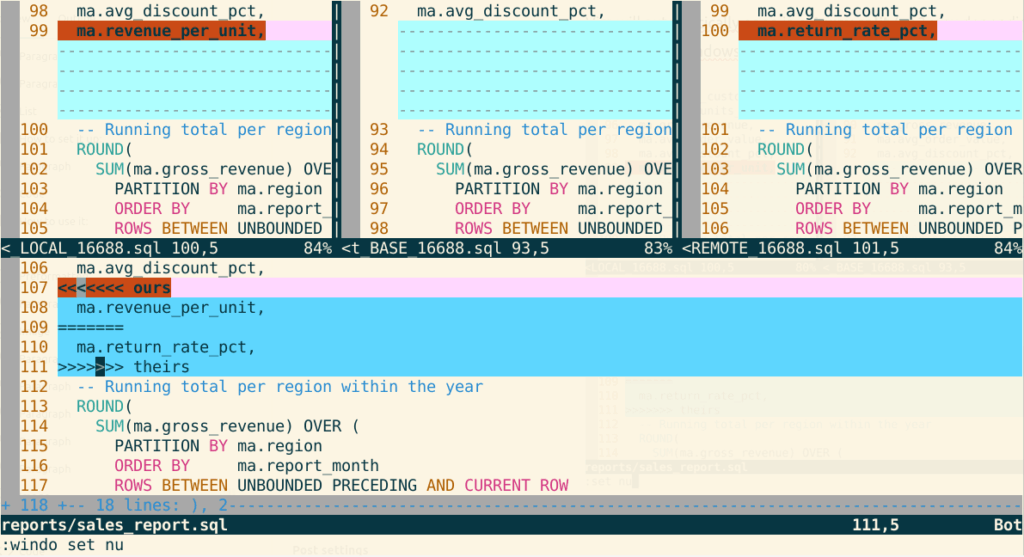
In the vimdiff merge layout, the bottom window is the MERGED file — the one that gets saved. The three tabs on top are just reference views: LOCAL (yours), BASE (common ancestor), REMOTE (theirs, e.g. main).
Git names these buffers LOCAL, BASE, REMOTE, MERGED, so you can pull entire conflict hunks from either side directly by name. Put your cursor inside the conflicted block in the MERGED window (bottom pane, around line 107), then:
— to accept LOCAL over REMOTE :diffget LOCAL keep ma.revenue_per_unit, drop ma.return_rate_pct
— to accept REMOTE over LOCAL :diffget REMOTE keep ma.return_rate_pct, drop ma.revenue_per_unit
Both of these replace the whole conflicted hunk (markers included) with that side’s version.
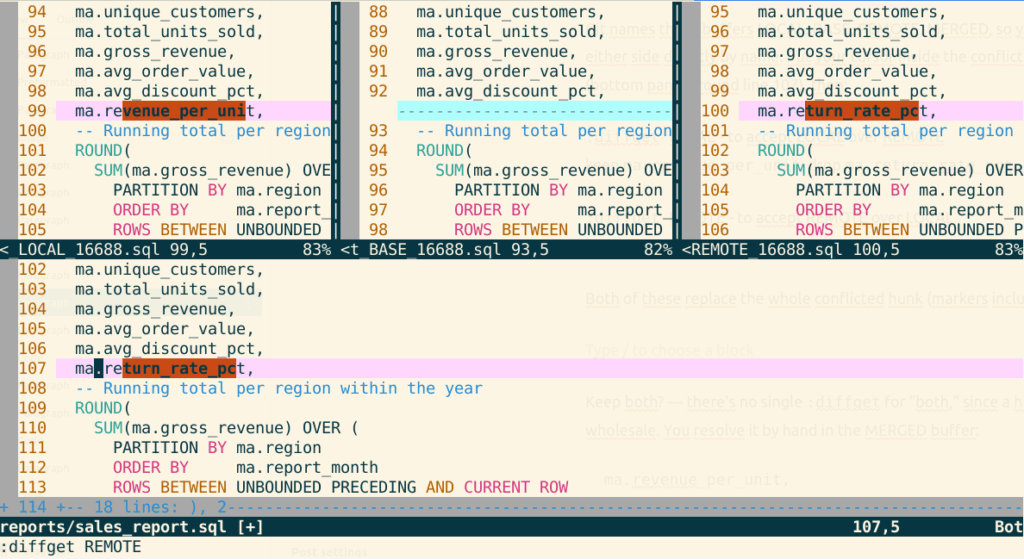
:wqa – quit the mergetool, saves and quits all windows.
Back in the shell:
git add reports/sales_report.sql
git commit
Keep both?
There’s no single :diffget for “both,” since a hunk-get takes one side’s content wholesale. You resolve it by hand in the MERGED buffer, i.e., manually delete (sequence d , d <<<<<<< ours=======>>>>>>> theirs
marker lines and just leave both column lines:ma.revenue_per_unitma.return_rate_pct
in whatever order makes sense. Since these are two independent added table columns rather than overlapping edits, that’s usually the right call here — you can literally just delete lines 107, 109, and 111 (the markers) and keep 108 and 110.
Extras
A couple of handy hints:
- IMPORTANT! keys sequnces ] , c / [ , c — jump to next/previous conflict hunk, execute before diffget
:diffget BASE— occasionally useful if you want to reject both sides and fall back to the ancestor versiongit checkout --merge -- <conflicted_file>— reset conflicts, if you accidently jumped out from the mergetool and you get:$ git mergetool
No files need merging
To be continued…
Links:
part 1, Vim in cloud
part 2, Vimdiff and repository
part 3, Work non-destructively (backup)